



In the fascinating world of data analysis, efficiency and precision are crucial. This is where Copilot comes into play, an impressive tool powered by artificial intelligence.
And when it joins forces with Power BI, a leading data analysis platform, the result is a formidable combination that can significantly improve your ability to obtain valuable insights from data.
However, the process of developing and creating reports in Power BI is not always a straightforward task. It requires knowledge of languages such as DAX, the ability to model data effectively, and the capacity to translate business requirements into meaningful visualizations.
Copilot is an innovative tool powered by artificial intelligence that drastically simplifies the development process in Power BI. It is the perfect combination of OpenAI’s advanced Codex technology and the power of Power BI, and its mission is to make report creation faster, simpler, and more accessible for everyone.
This article will guide you through Copilot and its integration with Power BI. We will explore how this AI tool can be your ally in data analysis and how to use it successfully in the context of Power BI. Throughout the article, we will provide practical examples and clear explanations so you can make the most of this powerful duo. Get ready to take your data analysis skills to the next level!
1. What is Copilot and how does it work?
In the exciting world of software and application development, artificial intelligence (AI) and machine learning (ML) have taken a giant leap in the last decade, revolutionizing the way we approach technology projects. One of the most mind-blowing examples of this revolution is OpenAI’s Codex, a system capable of generating code from natural language descriptions. And this is where Copilot enters the scene.
Copilot is like your best AI friend while you write code. Imagine it as a superintelligent extension of Visual Studio Code and GitHub Codespaces, two environments that devs love. What is amazing about Copilot is its ability to understand what you are doing and why you are doing it, which allows it to offer you suggestions that are like a tailor-made suit for your programming style and best practices.
So, when you encounter a programming challenge, Copilot is like having a genius development partner who throws ideas and code snippets at you. You can accept its suggestions as they are, modify them according to your needs, or simply say “thanks, but no thanks”.
But Copilot is much more than a simple code “autocomplete”. It helps you write software tests, create new functions, fix those bugs that make you pull your hair out, and, most amazingly, it can teach you new things! It can even convert your questions in human language into programming code. So if you ask, “How do I add two numbers?”, Copilot responds with the ready-made code. A kind of virtual genius!
The story gets interesting when Copilot joins Power BI: So far so good, right? But how does Copilot relate to Power BI? Well, get ready to discover how Copilot becomes your best friend in the exciting world of Power BI.
2. Copilot and Power BI: A Powerful Combination
Now that we have an idea of what Copilot is in the world of development, it is time to explore how this marvel of artificial intelligence integrates into the universe of Power BI.
Power BI, a universe of data and visualization: Power BI is a data analysis and visualization platform that allows organizations to connect to various information sources, transform and model data, create interactive reports and impactful dashboards, and share insights with colleagues and clients. In short, it is the key tool for making data-driven decisions.
How does Copilot join this data party?: Imagine you are working on your Power BI report and you encounter a problem or a task that requires some DAX code or a complicated data transformation. This is where Copilot comes in to make your life easier.
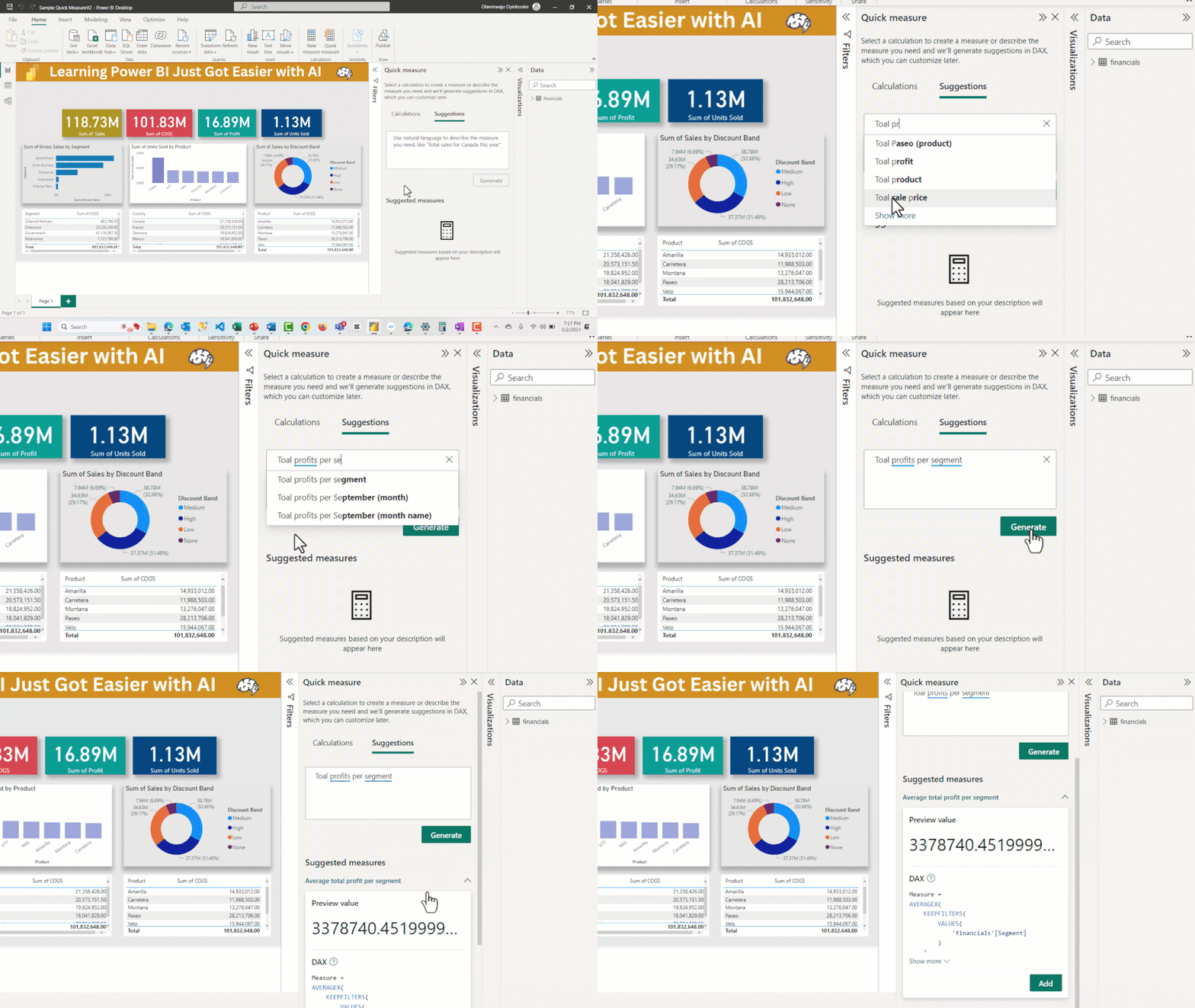
- Writing DAX formulas: One of the areas where Copilot shines intensely is in the creation of DAX formulas. Do you need to calculate a complex indicator or perform a particular data aggregation? Just describe what you want to achieve in natural language, and Copilot will generate the appropriate DAX formula for you.
- Data modeling: It can also help you in the data modeling process. If you need to create complicated relationships between tables or define custom calculations in Power Query (M), Copilot is there to simplify the process.
- Report generation: Imagine you want to create a report that shows sales by region and the best-selling products. You can ask Copilot, in human language, exactly that, and it will provide you with the report ready to use in Power BI!
- Learn and improve: Copilot not only does the work for you, but also helps you learn. It provides examples and explanations along with its suggestions, allowing you to better understand the concepts and best practices in Power BI.
With Copilot, creating reports in Power BI becomes a more accessible and efficient experience for everyone. You no longer need to be an expert in DAX or Power Query to get the most out of this powerful data analysis tool. Copilot acts as your virtual assistant, simplifying complicated tasks and allowing you to focus on what really matters: obtaining valuable insights from your data.
In the next section, we will explore some practical examples of how Copilot can be used in Power BI.
3. Practical Examples of Copilot in Power BI
Now that we understand how Copilot integrates into Power BI, let us take a look at some practical examples that illustrate how this combination can be an invaluable resource for data professionals and analysts.
Data modeling.
Imagine we are dealing with a complex dataset that includes sales, product, and customer information. We need to create relationships between these tables to obtain a meaningful report. With Copilot, we can describe the structure we want and the tool will help us define the necessary relationships and transformations.
Creating DAX formulas.
Suppose we are working on a sales report in Power BI and need to calculate the percentage variation in sales compared to the previous year. Traditionally, this would require knowledge of DAX to create a measure. With Copilot, we can write something like “Calculate the percentage variation in sales compared to the previous year” and the tool will automatically generate the correct DAX formula.
Generating complex reports.
Now, we want to create a report that shows sales performance by region and, at the same time, include a bar chart that highlights the best-selling products. Instead of spending hours developing this manually, we can simply ask Copilot: “Create a report that shows sales by region and the best-selling products”. The tool will take care of generating the complete report.
Creating custom measures with Copilot.
Imagine you are working on a data analysis project in Power BI and need to calculate a custom measure that reflects the quarterly sales trend. Traditionally, this would involve writing complex DAX formulas and understanding in detail how aggregation functions work in Power BI.
This is where Copilot can drastically simplify your task. You can simply describe what you want to calculate in natural language. For example, you can write: “Calculate the average quarterly sales trend for the last three years”. Copilot will analyze this request and automatically generate the corresponding DAX formula.
Copilot’s response might be something like:
As you can see, Copilot has generated a complete DAX formula that calculates the average quarterly sales trend for the last three years. This saves you time and reduces the possibility of errors when writing complex formulas.
Creating advanced visualizations with Copilot.
Another common scenario in Power BI is the creation of custom visualizations. Let us say you want to design an interactive scatter chart that shows the relationship between the price of your products and customer satisfaction, and additionally, you want the points on the chart to be colored according to the product category.
You can describe this request in natural language to Copilot: “Create a scatter chart that shows price versus customer satisfaction and color the points by product category”. Copilot will take this instruction and automatically generate the necessary code in Power BI to create this visualization.
The result could be a code similar to this:
Copilot has generated the code to create a custom scatter chart with colors based on the product category. This allows you to focus on interpreting the data instead of worrying about detailed coding.
These examples illustrate how Copilot can accelerate the development process in Power BI and make seemingly complicated tasks much more accessible. Now, data professionals can concentrate on analyzing and interpreting results instead of worrying about DAX syntax or data relationships.
In the next section, we will discuss some important considerations when using Copilot in Power BI and how to make the most of this powerful tool.
Advantages of using Copilot in the enterprise
The introduction of artificial intelligence-based technologies in the business environment is not simply a modern trend; it is a necessary evolution that addresses the growing demand for efficiency and productivity in a digitally connected world.
The main advantages of using Copilot within a company are:
Productivity
One of the maxims of the business world is “time is money”. Under this premise, Copilot presents itself as an invaluable ally. By taking care of repetitive or complex tasks that traditionally consume a large part of working time, Copilot allows workers to focus on strategic and creative activities. This reduction in execution times translates into more agile work cycles and the achievement of goals at a speed never seen before.
Collaboration
Teamwork is the fundamental pillar of any company. However, effective communication and frictionless collaboration can be elusive. Thanks to Copilot’s advanced AI functions, teams can improve their communication, access the necessary information instantly, and coordinate tasks with greater clarity. It is like having a permanent facilitator who ensures that everyone is on the same page.
Machine learning
Beyond simply assisting, Copilot has the surprising ability to learn. As users interact with this tool, Copilot adapts, understands their preferences, anticipates their needs, and ultimately provides even more personalized and precise results. This continuous learning feature ensures that the experience with Copilot improves over time, always aligning with the company’s changing objectives and user expectations.
Security and privacy
In an era where data security is paramount, Microsoft, with its unwavering commitment, guarantees that Copilot handles all data and content securely. Privacy is not an option; it is a requirement. With this in mind, companies can rest assured knowing that their information, and that of their clients, is protected and respected at all times.
4. Considerations and tips when using Copilot in Power BI
Although Copilot is a surprisingly useful tool in the world of Power BI, it is important to be aware of some considerations and follow some tips to make the most of its potential without falling into possible pitfalls. Here are some key suggestions:
Human Validation Copilot is powerful, but it is not infallible. You should always validate and review the suggestions it provides. Confirm that the calculations, data relationships, and visualizations are correct and meet the requirements of your project. Human oversight is essential to ensure the accuracy and quality of your reports.
Prior Knowledge in Power BI. While Copilot can facilitate many tasks, it does not replace the need to have a basic knowledge of Power BI. You must understand the fundamental concepts of data modeling, DAX language, and data visualization to use Copilot effectively. The tool can help you learn and improve, but a solid foundation is essential.
Customization of suggestions. Do not hesitate to customize the suggestions that Copilot provides you. The tool can generate code or visual elements that fit your specific needs. Modify and adapt the suggestions according to the requirements of your project and your working style.
Explore the full capabilities of Power BI Copilot is a valuable addition, but Power BI offers many features and capabilities beyond code and visualization generation. Make the most of the platform, explore custom visualizations, create advanced calculations, and use the publishing and collaboration features to collaborate with your team.
Constant Updates and Improvements. Keep in mind that Copilot and Power BI are constantly evolving. Stay up to date with updates and improvements in both tools. New features can further improve your workflow and open opportunities for more advanced analysis.
Collaboration and sharing. Copilot is not only useful for individual development, but also facilitates collaboration on Power BI projects. You can share code and visualizations generated by Copilot with other members of your team, which speeds up the joint development process.
Testing and experimentation. Do not be afraid to experiment with Copilot. Try different queries and requests to see how the tool responds. The more you use it, the better you will understand its scope and how it can benefit your Power BI projects.
In summary, Copilot is an exciting tool that can significantly improve the development process in Power BI. However, it is essential to combine its power with human knowledge and follow best practices to ensure accurate and high-quality results. With practice and experience, Copilot can become a valuable companion for any Power BI professional.
In the next section, we will explore the future prospects of Copilot and how it could influence the Power BI landscape.
5. The future of Copilot in Power BI: perspectives and possibilities
So far, we have explored how Copilot is transforming the way Power BI professionals develop reports and analyses. But what does the future hold for this powerful tool driven by artificial intelligence?
Expansion of Copilot’s capabilities. One of the most exciting prospects is the continuous expansion of Copilot’s capabilities in Power BI. As OpenAI improves its Codex model and Microsoft integrates these updates, we can expect Copilot to become even smarter and more useful. This means the tool could offer more advanced suggestions, better understand the specific contexts of projects, and assist with even more complex tasks.
Deeper integration with Power BI. Microsoft is committed to strengthening the integration between Copilot and Power BI. We could see greater collaboration between both companies to make the most of the capabilities of both platforms. This could include greater customization of Copilot to adapt to the unique features of Power BI and greater ease of use within the Power BI interface.
Education and training in Power BI with Copilot. As Copilot becomes an essential tool for Power BI development, specific education and training opportunities may emerge. This could include courses and resources that help users learn to use Copilot effectively, as well as understand the underlying concepts of Power BI. The combination of artificial intelligence and education can drive the growth of the Power BI community.
Improving the user experience. Microsoft and OpenAI are committed to constantly improving the user experience with Copilot. This includes simplifying configuration, optimizing the interface, and responding to user feedback. In the future, we can expect Copilot to become even more accessible and user-friendly, facilitating its adoption by a wider audience.
Potential for advanced automation. As Copilot becomes smarter and more sophisticated, it could open the door to advanced automation in Power BI. This means that some tasks, such as creating standard reports or generating repetitive code, could be handled entirely by Copilot. While this is an exciting prospect, it also raises questions about the supervision and control of automation in data analysis.
In conclusion, Copilot is a tool that has come to stay in the world of Power BI. Its impact on the efficiency and productivity of data professionals is undeniable. As Copilot evolves and integrates more deeply with Power BI, the possibilities for report development and analysis become increasingly exciting. Power BI professionals can look forward to a future full of innovation and opportunities as they make the most of this powerful combination of artificial intelligence and data analysis.
In the next section, we will conclude our journey through Copilot in Power BI and summarize the key aspects you should remember when using this revolutionary tool.
Conclusions: enhancing your Power BI experience through Copilot
In our journey through the world of Copilot in Power BI, we have explored how this innovative tool is transforming the way data professionals develop reports and analyses.
From its ability to generate DAX formulas in a matter of seconds to the creation of complete reports from simple natural language queries, Copilot has proven to be a valuable ally in the development process in Power BI.
Some key points you should remember when using Copilot in Power BI include:
- Increased productivity: Copilot accelerates the development process by providing intelligent and relevant suggestions. This means less time spent writing code and more time for analysis and decision-making.
- Facilitates learning: Copilot is not only a development tool, it is also a learning resource. It provides examples and explanations that can help you improve your Power BI skills and better understand key concepts.
- Need for human validation: Although Copilot is powerful, it does not replace the need for human validation. You should always review and verify the suggestions it offers, especially in critical or complex projects.
- Promising future: Copilot continues to evolve and its integration with Power BI will strengthen over time. Expect continuous improvements in the tool’s capabilities and a more intuitive user experience.
- Automation potential: As Copilot becomes more sophisticated, it opens the door to advanced automation in Power BI. This could change the way we approach repetitive and standard tasks in data analysis.
Ultimately, Copilot in Power BI is a combination of the best of artificial intelligence and Microsoft’s data analysis platform. Its ability to simplify development and improve efficiency is undeniable. As you continue to use this revolutionary tool, explore new ways to leverage its potential and stay tuned for the updates and improvements that will undoubtedly keep coming.
So, are you ready to take your Power BI experience to the next level with Copilot? Go ahead and start discovering everything this powerful tool has to offer on your data analysis journey!