


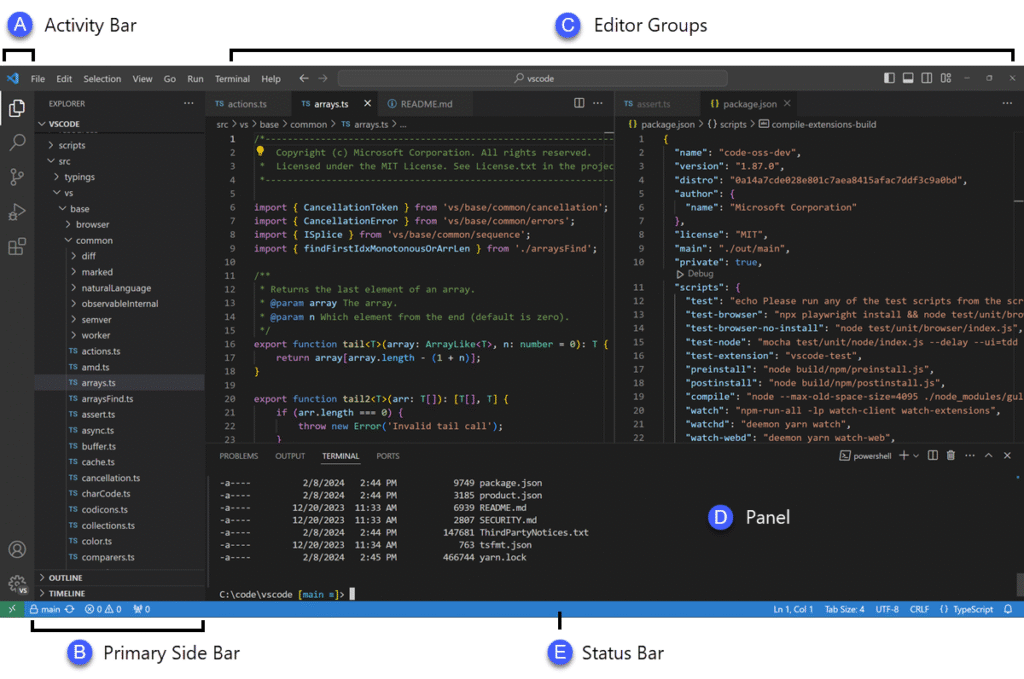
Visual Studio: Gateway to Professional Development
For technology managers, the choice of an integrated development environment is critical to team productivity and efficiency. Microsoft Visual Studio stands as the platform par excellence, offering a solid foundation from the very first moment and guaranteeing agile deployment for any software project.
Focus on the strategic installation of Visual Studio
The first step to maximizing return on investment with Visual Studio IDE is a meticulous and well-planned installation. It is not just about downloading Visual Studio in a generic way, but about a strategic selection of workloads that optimize the environment for your team’s specific needs.
This process includes opting for essential modules such as .NET desktop development, web and cloud tools with ASP.NET Core, or cross-platform mobile development with Xamarin. At the Microsoft Campus in Redmond, Washington, this granularity is emphasized to avoid superfluous installations, ensuring an agile and relevant IDE for each developer.
A well-conceived installation significantly reduces the software footprint on company systems and improves the overall system performance of developers. It is essential that IT teams thoroughly understand how to install Visual Studio in a way that aligns the IDE’s capabilities with the organization’s strategic development objectives, minimizing initial downtime.
Configuration and customization for maximum efficiency
After installation, the initial configuration is a fundamental pillar for a productive immersion and a notable increase in development speed. Visual Studio allows deep customization of visual themes, editor color schemes, and the assignment of custom keyboard shortcuts that can drastically accelerate the developer’s daily workflow.
This level of adaptability is one of the most valued Visual Studio features among experienced teams, as it empowers each programmer to shape their workspace. For example, a developer focused on the Visual Studio C# debugger can configure specific quick-access shortcuts to optimize their testing and error-resolution sessions.
The ability to create a tailor-made work environment fosters a smooth learning curve and faster adoption of the IDE among new talent. Firms like KCP Dynamics, experts in business process optimization, understand that an environment configured with best practices is synonymous with operational efficiency, directly impacting the quality and speed of software delivery.
The first project: foundations for immediate success
Creating the first project in Visual Studio is a crucial milestone that marks the beginning of a productive development experience. The intuitive project wizard guides the developer through preconfigured and robust templates, allowing rapid initiation of complex or simple application development.
From a basic console application to advanced web services and microservices, the environment is designed to facilitate frictionless project creation. This is vital for programming with Visual Studio effectively, ensuring that developers can focus on business logic and innovation from the very first minute, building solid foundations for future projects.
Strategic InstallationSelect specific workloads to optimize the IDE, minimizing resources and maximizing relevance for your team.
Deep CustomizationAdapt themes, keyboard shortcuts, and settings to boost individual and team productivity.
Agile Project WizardUse robust templates to start projects quickly, building solid foundations for any development.
Accelerating development with intelligence and code refactoring
For technology managers, code efficiency and quality are strategic pillars that underpin the success of any software initiative. Microsoft Visual Studio positions itself as a comprehensive solution that goes beyond a simple editor, transforming the development process through intelligence and automation.
Optimization with IntelliSense and Smart Autocomplete
The IntelliSense feature is vital in this ecosystem; its predictive autocomplete and contextual help significantly minimize distractions. It offers real-time code suggestions, facilitating API exploration and drastically reducing the need to memorize complex syntax or search for external documentation.
Furthermore, IntelliSense proactively detects errors as the developer writes code, an invaluable functionality for maintaining quality from the early stages of the software lifecycle. This translates directly into less time spent on tedious debugging and greater focus on resolving complex business logic problems, improving the experience of programming with Visual Studio.

Refactoring and Code Snippets for Agile Development
The Visual Studio IDE also boosts efficiency through the incorporation of customizable code snippets, essential tools for automating repetitive tasks. These allow standard code blocks to be inserted quickly and accurately, promoting consistency within the team and accelerating the implementation of new features and modules.
Intelligent refactoring, with automatic options such as renaming variables or extracting methods, is a critical functionality for keeping the codebase clean, readable, and highly maintainable. This capability is crucial for the proactive management of “technical debt”, ensuring that software maintenance and evolution are significantly more efficient and less costly in the long run.
Leading companies like KCP Dynamics, with their deep knowledge in business process optimization, understand that tools like automatic refactoring within the Visual Studio development environment are fundamental. These capabilities are key to delivering robust and scalable solutions, successfully managing complex and demanding projects.
Strategic Impact on Team Quality and Productivity
These advanced Visual Studio features are not mere operational improvements; they represent a direct strategic impact on the overall productivity of the team and the intrinsic quality of the final product. They empower developers to dedicate their talent to innovation and high-value problem solving.
Ultimately, the integration of these intelligent tools into the development workflow ensures a smoother and faster coding experience. This translates into notably more efficient software deliveries and more reliable products, an undeniable and strategic value for any technology manager seeking operational excellence.
IntelliSense and AutocompleteMinimize distractions with real-time code suggestions and proactive error detection.
Code SnippetsAutomate repetitive tasks and insert standard code blocks for fast and consistent implementation.
Intelligent RefactoringKeeps the codebase clean and readable, managing technical debt and improving maintainability.
Advanced debugging: uncovering errors with pinpoint precision
In today’s software development landscape, the ability to identify and resolve failures quickly is a critical differentiator. Microsoft Visual Studio offers technology managers an arsenal of advanced debugging tools, essential for maintaining operational efficiency and code quality.
Optimizing logic with conditional breakpoints
Conditional breakpoints represent a fundamental evolution in debugging. They allow execution to be paused only when specific conditions are met, avoiding unnecessary interruptions in extensive loops or repetitive situations.
A developer can configure, for example, a breakpoint to activate only when a variable exceeds a certain threshold, or when executing on a specific thread. This precision drastically reduces analysis time in complex projects, improving team productivity.
Strategic performance monitoring with diagnostic tools
Beyond code logic, the Visual Studio development environment integrates powerful diagnostic tools to evaluate application performance in real time. These include the CPU usage analyzer, the memory usage tool, and energy diagnostics.
Managers can visualize bottlenecks in resource allocation or memory leaks, detecting inefficiencies before they impact the end user. These functionalities are crucial for optimizing enterprise applications, a specialty where KCP Dynamics demonstrates its deep expertise in software development.
Decoding complex data with intuitive visualizers
The inspection of variables during debugging is greatly enhanced by Visual Studio’s data visualizers. These transform complex data structures, such as JSON or XML objects, into comprehensible graphical or tabular representations, simplifying their analysis.
For example, the HTML visualizer or the dataset visualizer can present information in a readable format that accelerates error identification. For developers working with the Visual Studio C# Debugger, this capability is invaluable for quickly understanding the state of the application.
In summary, advanced debugging in Visual Studio not only speeds up fault resolution, but also elevates software quality. It gives teams the ability to go beyond surface-level detection, ensuring robust performance and an impeccable user experience, a vital aspect for any technology manager.
Conditional BreakpointsPause execution only under specific conditions. Reduces analysis time in extensive loops and complex scenarios.
Diagnostic ToolsMonitor CPU, memory, and energy in real time. Identify bottlenecks and leaks to optimize performance.
Intuitive Data VisualizersTransforms complex structures (JSON, XML) into graphical and tabular formats, accelerating understanding and error detection.
Extended ecosystem: continuous integration and complementary tools
The value of Microsoft Visual Studio transcends its functionality as an individual IDE; it lies in its ability to integrate with a vast ecosystem of tools. This synergy is crucial for team collaboration and comprehensive software lifecycle management, vital aspects for any technology management team seeking to optimize processes and results. Native connectivity is the key to superior operational efficiency.
Native Git integration: centralized version control
The integration with Git within the Visual Studio IDE is a core functionality that significantly streamlines version control. Developers can manage repositories, create and merge branches, make commits, and review the change history directly from the interface. This functionality eliminates the need to switch between multiple applications, consolidating essential operations in a single environment.
This robust integration not only facilitates individual work, but also enhances collaboration on complex projects. Visual tools allow merge conflicts to be resolved with ease, ensuring that teams maintain a continuous and uninterrupted workflow. The ability to program with Visual Studio while maintaining granular control of each version is indispensable for code integrity in large-scale projects.
Azure DevOps: the unified platform for the software lifecycle
Visual Studio extends its reach into project management and development automation through its deep integration with Azure DevOps. This connection allows teams to plan sprints, manage work items, and track project progress efficiently. Full visibility of the backlog and tasks ensures constant alignment between business objectives and technical development.
Furthermore, Azure DevOps is the engine for implementing continuous integration and delivery (CI/CD), allowing teams to configure robust pipelines for automated builds, testing, and deployment. This automation is critical for reducing errors and accelerating release cycles, resulting in greater operational agility. Companies like KCP Dynamics, experts in business process optimization and development, leverage this synergy to implement solutions that transform the efficiency of their clients.
The Extensions Marketplace: customization and expansion without limits
The Visual Studio development environment benefits enormously from its vibrant Extensions Marketplace, a portal that offers thousands of tools and add-ons to customize and expand its capabilities. From support for new languages and frameworks to code analysis utilities or visual themes, the Marketplace ensures that the IDE adapts to any need. This includes everything from extensions for Visual Studio for web development to specific productivity tools.
The ease of finding and “downloading Visual Studio” extensions means that technology managers can ensure their teams have access to the most innovative tools without compromising the consistency of the environment. This flexibility is one of the most valued Visual Studio features, allowing the IDE to remain at the technological forefront and optimized for any development challenge, from legacy projects to emerging technologies.
Git: Integrated Version ControlManage repositories, branches, and commits without leaving Visual Studio, streamlining the collaborative workflow.
Azure DevOps: CI/CD and Project ManagementPlan sprints, automate builds, tests, and deployments for continuous and efficient delivery.
Marketplace: Expansion and CustomizationAccess thousands of extensions to adapt the IDE to any language, framework, or specific development need.
Diverse platforms: building the future with .NET, C++, and web/mobile development
The dynamism of the technology sector demands versatile and robust tools. Microsoft Visual Studio emerges as the professional development environment par excellence, empowering teams to tackle growing complexity across multiple platforms. Its adaptable architecture makes it a strategic pillar for any IT department seeking efficiency and reach.
.NET MAUI: Unifying cross-platform development
In the realm of enterprise application development, efficiency is paramount. Visual Studio powers .NET MAUI, allowing developers to create modern user interfaces and native applications for Windows, iOS, Android, and macOS from a single codebase. This optimizes development resources and significantly accelerates time to market.
The ability of .NET MAUI to unify development drastically reduces duplication of effort, a critical advantage for technology managers. By programming with Visual Studio using this technology, a consistent user experience is guaranteed across all devices, from mobile phones to large desktop screens.
Native C++: Power and performance without limits
When performance is the decisive factor, Visual Studio’s support for C++ is unmatched. This professional IDE facilitates the creation of high-performance systems, game engines, low-level applications, and critical components that demand maximum speed and control. It is the preferred choice for industries such as automotive or finance, where every millisecond counts.
The Visual Studio IDE offers a complete set of tools for C++, including industry-leading compilers, debuggers, and performance analysis tools. This allows engineers to optimize every line of code, guaranteeing the reliability and efficiency of complex solutions that drive technological innovation.
Modern Web and Mobile Development: Addressing every challenge
Beyond desktop applications and native performance, Visual Studio excels in modern web development. It provides comprehensive support for technologies such as HTML, CSS, JavaScript, and TypeScript, as well as frameworks like ASP.NET Core. This breadth allows teams to build dynamic and scalable web experiences, tailored to the demands of today’s digital landscape.
The platform also extends its capabilities to native mobile development, ensuring that companies can reach their users on any device. For organizations that require comprehensive and customized solutions in their business processes, the expertise of experts like KCP Dynamics in development with these technologies is invaluable, demonstrating the versatility of Visual Studio in complex scenarios.
In summary, Visual Studio is a strategic investment for any organization. Its ability to handle such a broad spectrum of technologies and platforms ensures that companies can build the future, adapting to any development requirement and optimizing the delivery of technological value.
.NET MAUIUnifies native app development for Windows, iOS, Android, and macOS from a single codebase, optimizing resources and accelerating time to market.
Native C++Create high-performance systems, game engines, and critical components with maximum speed and control, ideal for industries demanding extreme efficiency.
Modern Web and MobileComprehensive support for HTML, CSS, JavaScript, TypeScript, and ASP.NET Core, as well as native mobile development for dynamic and scalable experiences.
Conclusions and final recommendations
This analysis has broken down how Microsoft Visual Studio stands as an indispensable tool for professional software engineering. Its value proposition lies in the synergy of capabilities that drive efficiency and quality at every phase of the development cycle, establishing itself as the standard for building the technological future.
Key points to remember
- Enhanced Productivity: The Visual Studio IDE is key to maximizing team efficiency, integrating artificial intelligence and refactoring that minimize effort and elevate code quality.
- Non-Negotiable Quality: Advanced debugging tools allow problems to be identified and resolved with critical accuracy, ensuring the reliability and robustness of the delivered software.
- Seamless Integration: Its ecosystem fosters the adoption of DevOps practices, facilitating continuous integration and delivery for faster and more consistent release cycles.
- Broad Technological Reach: It allows teams to program with Visual Studio across multiple platforms and languages, from .NET and C++ to web and mobile development, adapting to market demands.
- Strategic Decision: For technology managers, choosing Microsoft Visual Studio represents a fundamental investment in the innovation capacity and competitiveness of their organization.
Practical recommendations
To fully capitalize on the potential of Microsoft Visual Studio, technology managers should foster a culture of deep exploration of all its functionalities. It goes beyond mere programming; it is vital to train teams to master refactoring tools, advanced debugging, and continuous integration capabilities, which will transform the way projects are developed.Consider standardizing the Visual Studio IDE as the primary environment for software development, ensuring that your teams are equipped with the latest version by downloading Visual Studio. This guarantees consistency, optimizes workflows, and facilitates collaboration. For complex enterprise projects or to optimize existing processes, seeking the guidance of experts like KCP Dynamics can be invaluable. Their expertise in developing solutions tailored to business processes can maximize the return on investment in this powerful tool.Adopting a strategic vision in the use of this Visual Studio development environment will position your company at the technological forefront, enabling agile adaptation to future market demands and maintaining competitive advantage.By deeply integrating Microsoft Visual Studio into your development strategy, you will not only optimize the present, but also pave the way for continuous innovation and excellence in the digital future. It is time to empower your teams and transform ideas into impactful solutions.
Enhanced ProductivityThe Visual Studio IDE maximizes team efficiency with AI and refactoring.
Non-Negotiable QualityAdvanced debugging tools ensure the reliability and robustness of the software.
Seamless IntegrationFosters DevOps practices for efficient continuous integration and delivery.