



Your planner has spent hours reconciling spreadsheets. Dead stock keeps growing. And the last inventory stockout cost you an order that never came back. The problem isn't a lack of data: it's that data doesn't turn into action fast enough.
AI agents in supply chainchange exactly that: they move from generating reports to executing decisions, autonomously, in real time.This article is for CTOs and heads of operations in manufacturing and retail who already know AI exists, but need to understand what it does in production, what ROI it generates, and how it fits with their current ERP.
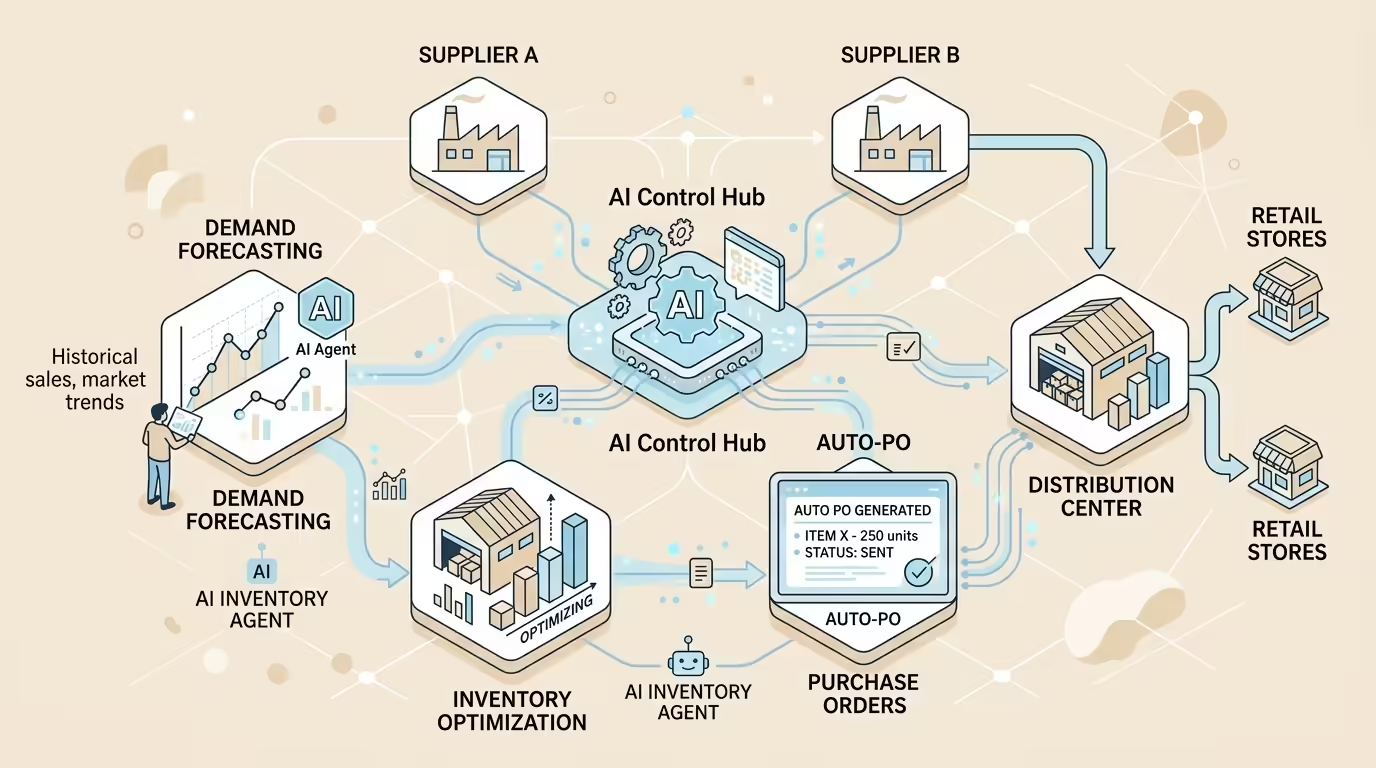
What an AI agent in supply chain is (and what it isn't)
A chatbot answers questions. A dashboard shows numbers. An AI agent does something different: it perceives context, reasons about it, and executes an action within the system, without waiting for a human to press a button.
In the supply chain context, this means the agent can detect that a SKU level is falling below the reorder point, calculate the optimal purchase quantity considering lead times and negotiated prices, generate the purchase order, and send it to the supplier — all within minutes. Without manual intervention.
The technical distinction matters for those making investment decisions. There are three types of agents you’ll find on platforms like Dynamics 365 SCM:
- Task agents: automate a defined process, such as purchase order tracking or supplier communications.
- RAG agents (Retrieval-Augmented Generation): retrieve information from authoritative sources to answer questions grounded in real business data.
- Autonomous agents: contextual and adaptive, capable of chaining multiple steps and making decisions within limits defined by the organization.
Most companies in LATAM are currently using the first type. The leap to the third is where the differential ROI lies.
The real problem: why traditional forecasting methods fail
Demand forecasting based on historical averages and expert judgment has a structural flaw: it is retrospective in an environment that changes every week. An unplanned marketing campaign, a weather event, or a regional tariff change can invalidate three months of planning in 48 hours.
AI-based prediction models use machine learning algorithms and large-volume data analysis to identify patterns and trends in real demand behavior, incorporating external variables that traditional statistical methods ignore: seasonality, market signals, consumption trends, and external events.
The practical result is a significant reduction in two types of error that destroy margin: excess stock (tied-up capital, storage costs, obsolescence risk) and stockouts (lost sales, customer penalties, damage to the commercial relationship). Neither is acceptable in competitive manufacturing or retail.
AI demand forecasting: from spreadsheet to predictive model
How the prediction engine works
AI demand prediction analyzes historical data, identifies non-linear patterns, and generates forecasts with greater accuracy than traditional methods. But what sets it apart from a standard statistical model is its ability to incorporate external signals: competitor price variations, supplier alerts, real-time point-of-sale data, and search trends.
In Dynamics 365 SCM, the demand planning module allows forecast accuracy to be improved using AI, proprietary machine learning models, and external signals, with automatic explanations and integrated reporting. This means the planner doesn’t just receive a number: they receive the reasoning behind the number, which facilitates validation and confidence in the model.
Scenarios and simulation: planning for the unpredictable
A single forecast is not enough in volatile environments. AI makes it possible to generate alternative scenarios — base, optimistic, pessimistic — that give the operations team a decision range, not a false sense of certainty.
This simulation capability is especially critical in manufacturing, where material lead times can exceed 8 weeks. Planning on a single scenario in that context means taking on unnecessary risk. With multiple scenarios, the team can define differentiated safety stock policies by SKU and by supply risk level.
Inventory optimization: from static stock to dynamic inventory

Inventory is the mirror of forecast quality. A bad forecast generates dead stock or stockouts. But even with a good forecast, static inventory management wastes capital.
AI agents in supply chain can evaluate inventory levels across the entire network in real time, initiate transfers between nodes when a regional imbalance is detected, adjust reorder points by SKU based on real demand variability, and reallocate stock before a stockout occurs. All of this without human intervention for each individual decision.
The Warehouse Advisor Agent available in the Dynamics 365 SCM ecosystem applies machine learning and predictive analytics to automate key processes such as optimal product placement (slotting), inventory consolidation, and cycle counting, delivering actionable insights that enable faster and more accurate decisions in the warehouse.
Autonomous purchasing: the agent that manages suppliers without manual emails
The Supplier Communications Agent in action
The traditional purchasing process in a medium-to-large company generates hundreds of manual interactions per week: order tracking, delivery confirmation, delay management, date updates. Most of those interactions are repetitive and of low strategic value, yet they consume the time of people who should be negotiating contracts or managing long-term relationships.
The Supplier Communications Agent in Dynamics 365 SCM automates exactly those routine communications. When a supplier reports a delay in a component, the Procurement Agent analyzes the communication, associates it with the affected purchase order, and synthesizes the cascading impact on inventory, sales orders, and production schedules. If stock is available at another node in the network, the agent identifies it and presents it as an option. The purchasing manager reviews the recommendation and makes the decision, without having to manually trace the impact across multiple systems.
Autonomous purchasing within defined limits
Autonomous purchasing does not mean purchasing without control. The right model is what Microsoft calls “human-in-the-loop with delegated autonomy”: humans define the strategy, policies, and limits; agents execute within those limits and escalate when they go beyond them.
In practice, this is configured in Dynamics 365 SCM through purchasing policies: the agent can issue automatic replenishment orders for low-risk, high-turnover SKUs, automatically applying negotiated prices according to the terms of the current contract. For strategic SKUs or sole-source suppliers, the agent prepares the order and places it in a human approval queue. The result is a reduction in the purchasing cycle time without sacrificing control over critical decisions.
Dynamics 365 SCM as an agent platform: real architecture
Understanding the architecture matters for CTOs who need to validate the investment and for implementation teams who need to execute it.
Dynamics 365 SCM offers prebuilt task agents that activate within the applications and manage common processes such as supplier communications or purchase order updates. These agents are designed to accelerate adoption and build confidence by simplifying routine processes without requiring heavy customization.
From there, organizations can extend and customize those experiences using Copilot Studio, Microsoft’s low-code platform for creating and modifying AI agents. Copilot Studio works in conjunction with the Model Context Protocol (MCP) Server, which provides agents with secure, governed access to business processes and data in Dynamics 365. This means agents can read and write to the ERP — updating orders, adjusting supply plans, initiating transfers — based on current conditions, without uncontrolled access to data.
For retail, Microsoft Copilot Studio allows retailers to build custom agents that encode their own business rules into replenishment, allocation, fulfillment, and in-store execution processes, aligning agent behavior directly with the way the business operates.
ROI in LATAM manufacturing and retail: what to measure and what to expect

The ROI conversation with a CTO or CFO in LATAM has to be concrete. Not “it improves efficiency”: how much, in which process, in what timeframe.
The patterns we observe in AI agent supply chain implementations with Dynamics 365 SCM point to three areas of measurable impact:
- Reduction in purchasing communication cycle time: automating order tracking and supplier confirmations can reduce the manual time spent on these tasks by up to 60%, freeing the procurement team for strategic work.
- Improvement in forecast accuracy: AI-based demand models incorporate more variables and are recalibrated more frequently than manual models, reducing forecast error and, with it, unnecessary safety stock.
- Reduction in dead stock: dynamic inventory optimization adjusts levels by SKU based on real demand, not historical averages, reducing capital tied up in slow-moving products.
The realistic timeframe to see measurable results across these three indicators, with a well-executed implementation on Dynamics 365 SCM, ranges from 60 to 120 days from go-live. It’s not magic: it’s process plus data plus a well-configured agent.
How to get started: an implementation roadmap without surprises
The most common mistake in AI agent supply chain projects is trying to automate everything at once. The approach that works in production is incremental: start with quick wins, build confidence in the model, and scale.A proven roadmap for medium-to-large manufacturing and retail companies in LATAM has three phases:
- Phase 1 — Activate prebuilt agents (weeks 1–4): deploy the Supplier Communications Agent and the Sales Order Agent. This is configuration, not development. Generate adoption data and first time-saving metrics.
- Phase 2 — Connect forecasting and inventory optimization (weeks 5–12): activate the AI demand planning module in Dynamics 365 SCM. Calibrate the model with clean historical data. Define safety stock policies by SKU segment.
- Phase 3 — Autonomous purchasing within policies (weeks 13–20): configure delegated autonomy rules for automatic replenishment on low-risk SKUs. Integrate escalation alerts for sole-source suppliers or purchases above a value threshold.
At KCP Dynamics we work through this roadmap with our clients from the diagnostic phase to go-live, with adoption and ROI metrics defined before implementation begins.
No theory: what works in production in LATAM.Frequently asked questions
Do AI agents in supply chain replace demand planners?
No. Agents automate repetitive, low-risk decisions and prepare complex decisions with data and recommendations. The planner remains responsible for validating the model, defining policies, and managing exceptions. What changes is that they stop spending hours reconciling data and can focus on strategic analysis.What happens if the agent makes an incorrect purchasing decision?
Well-designed implementations include clear autonomy limits: the agent operates within policies defined by the organization and escalates to human approval when a decision exceeds those limits. In addition, all agent actions are recorded in the ERP, enabling a complete audit of every decision executed.How long does it take to implement AI agents in Dynamics 365 SCM?
Prebuilt agents such as the Supplier Communications Agent can be operational in weeks, not months. A complete roadmap that includes demand forecasting and autonomous purchasing within policies requires between 4 and 5 months in a well-executed implementation, depending on the quality of master data and the complexity of existing purchasing processes.Is it necessary to replace the current ERP to implement AI agents?
If you already have Dynamics 365 SCM, agents are activated as additional capabilities within the platform. If you have a different ERP, integration is possible through connectors and the Model Context Protocol (MCP), although the level of native functionality is greater within the Microsoft ecosystem.Sources
- Agentic LLMs in the Supply Chain: Towards Autonomous Multi-Agent Consensus-Seeking
- Leveraging Artificial Intelligence as a Strategic Growth Catalyst for Small and Medium-sized Enterprises
- SCSimulator: An Exploratory Visual Analytics Framework for Partner Selection in Supply Chains through LLM-driven Multi-Agent Simulation
- AI in the supply chain: from predictive insights to action with agents | Automation Anywhere
- AI in retail drives supply chain resilience
{"@context":"https://schema.org","@type":"FAQPage","inLanguage":"en","mainEntity":[{"@type":"Question","name":"Do AI agents in supply chain replace demand planners?","acceptedAnswer":{"@type":"Answer","text":"\u003Cp\u003ENo. Agents automate repetitive, low-risk decisions and prepare complex decisions with data and recommendations. The planner remains responsible for validating the model, defining policies, and managing exceptions. What changes is that they stop spending hours reconciling data and can focus on strategic analysis.\u003C/p\u003E"}},{"@type":"Question","name":"What happens if the agent makes an incorrect purchasing decision?","acceptedAnswer":{"@type":"Answer","text":"\u003Cp\u003EWell-designed implementations include clear autonomy limits: the agent operates within policies defined by the organization and escalates to human approval when a decision exceeds those limits. In addition, all agent actions are recorded in the ERP, enabling a complete audit of every decision executed.\u003C/p\u003E"}},{"@type":"Question","name":"How long does it take to implement AI agents in Dynamics 365 SCM?","acceptedAnswer":{"@type":"Answer","text":"\u003Cp\u003EPrebuilt agents such as the Supplier Communications Agent can be operational in weeks, not months. A complete roadmap that includes demand forecasting and autonomous purchasing within policies requires between 4 and 5 months in a well-executed implementation, depending on the quality of master data and the complexity of existing purchasing processes.\u003C/p\u003E"}},{"@type":"Question","name":"Is it necessary to replace the current ERP to implement AI agents?","acceptedAnswer":{"@type":"Answer","text":"\u003Cp\u003EIf you already have Dynamics 365 SCM, agents are activated as additional capabilities within the platform. If you have a different ERP, integration is possible through connectors and the Model Context Protocol (MCP), although the level of native functionality is greater within the Microsoft ecosystem.\u003C/p\u003E"}}]}