



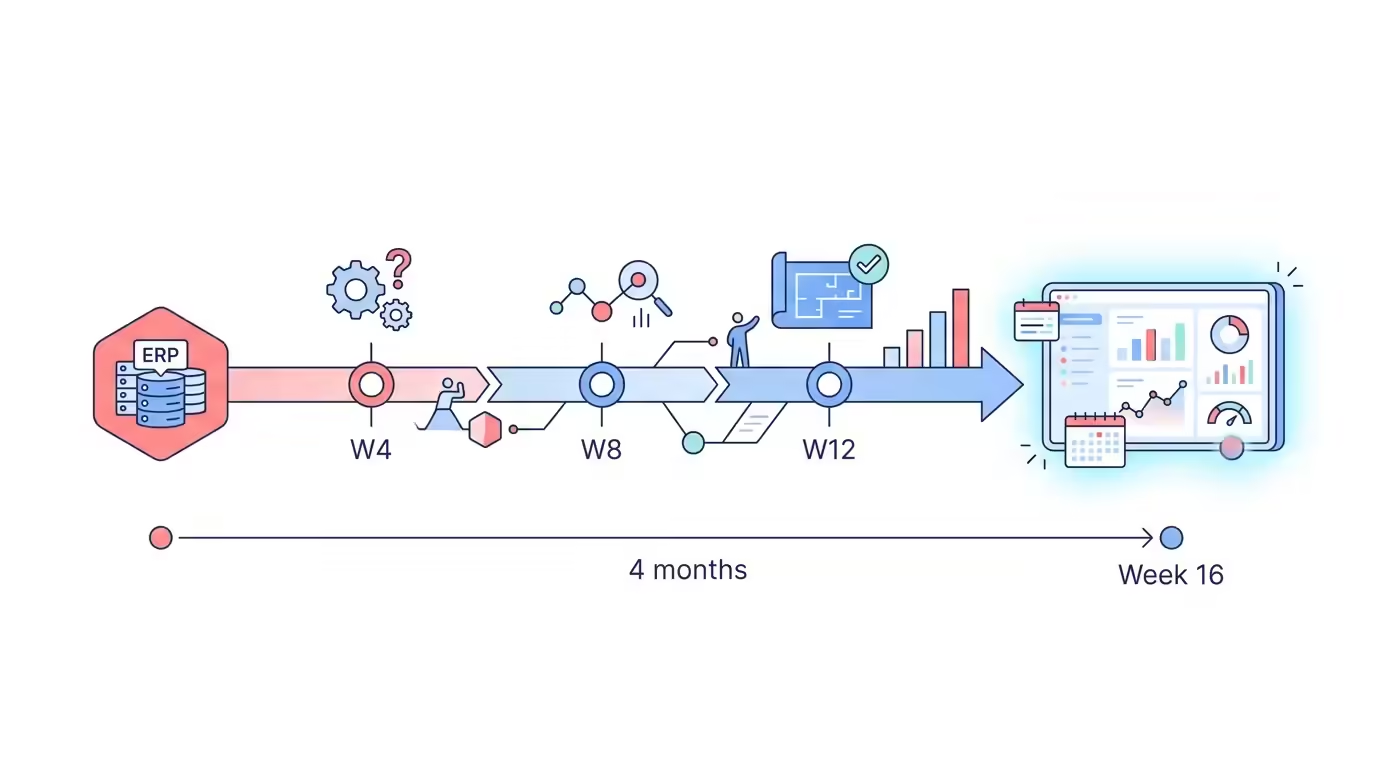
Your current ERP has reached its limits. Monthly closes drag on, inventory lives in spreadsheets, and every department runs on its own system. You know you need Dynamics 365, but the fear is real: how long is this going to take? Can I afford to halt operations for six months? The short answer is that you don’t have to. A well-executed fast Dynamics 365 implementation can take you to go-live in four months without paralyzing your business, as long as you know exactly what to do in each week of the project.
This article is not theory. It is the roadmap we apply with SMBs in LATAM that needed to modernize their ERP with limited resources and no margin for error.
Why 60% of ERP Implementations Run Over Schedule (and How to Avoid It)
The problem is not the technology. The problem is the lack of scope control from day one. Every new requirement that enters the project after kick-off adds weeks to the calendar. Every customization approved without analysis adds risk to the go-live. And every area without a clear owner turns meetings into unresolved debates.
The patterns we see repeated in failed projects are always the same:
- Uncontrolled scope creep: the project starts with finance and inventory, and by week 6 someone asks to integrate the CRM, the customer portal, and regulatory reports.
- Dirty data in migration: moving duplicate, incomplete, or incompatibly formatted records is the number-one cause of delays in the go-live phase.
- No active executive sponsor: without someone with real authority to unblock decisions, the project gets stuck in intermediate approvals.
- Excessive customization: every line of custom code adds development time, testing, and regression risk in future updates.
The good news: all of these factors are preventable. Business Central, Microsoft’s cloud ERP for SMBs, is designed to minimize customization and leverage standard functionality that covers 80–85% of the typical processes of a mid-sized company. That is what makes an accelerated go-live possible.
The 4-Month Roadmap: Phases and Week-by-Week Deliverables
Four months is an achievable timeline for an SMB with defined processes, reasonably clean data, and a partner with a proven methodology. It is not the fastest possible scenario nor the most comfortable: it is the balance between speed and risk that works in production.
Month 1 — Discovery and Solution Design
The first week is diagnostic. The consulting team maps the critical processes: finance, purchasing, sales, and inventory. Required integrations with existing systems are identified, and an inventory of data to be migrated is established. The deliverable of this phase is a design document approved by the executive sponsor, not a draft in permanent review.
In the second and third weeks, the definitive scope is locked. This is where the most important decision of the project is made: what goes into the month-4 go-live and what is deferred to a later phase. The rule we apply at KCP Dynamics is clear: if a requirement does not have a documented business process and an owner to validate it, it does not enter the initial scope.
The fourth week kicks off data preparation. Auditing and cleaning the master records for customers, vendors, and items before configuration begins is what separates projects that reach go-live on time from those that run two months over in the testing phase.
Month 2 — Configuration and Build
With the design approved, the technical team configures the environment in Business Central. This includes the chart of accounts, financial dimensions, approval workflows, and inventory parameters. For an SMB with standard requirements, this phase takes between four and six weeks when working with out-of-the-box functionality.
Integrations with tools in the Microsoft ecosystem (Outlook, Teams, Power BI) are native and consume no development time. Integrations with external systems—electronic invoicing, banking portals, e-commerce platforms—do require technical planning and must be identified from month 1.
By the end of month 2 you should have a configured and functional environment in sandbox, ready for key users to begin validating the main workflows.
Month 3 — Testing, Training, and Data Migration
This month is the most intense for the client’s internal team. Key users run acceptance tests on the configured workflows: they create purchase orders, post invoices, and close accounting periods. Every issue they catch here is an issue you will not see in production.
Data migration runs in parallel: first in the test environment to validate integrity, then the final migration is prepared for go-live. Historical data that is not critical to daily operations is archived outside the main system to avoid contaminating performance.
Training is not a two-hour session the day before go-live. It is structured by role: the finance team learns the accounting workflows, the warehouse team learns inventory management, and purchasing managers learn the approval cycle. Each session ends with a hands-on exercise using real company data.
Month 4 — Go-Live and Hypercare
The go-live week follows a defined protocol: data freeze in the legacy system, final migration, validation of opening balances, and launch into production. This is not the time to introduce configuration changes or approve new requirements.
The first two weeks post-go-live are hypercare: the consulting team is available to resolve incidents in real time, adjust minor configurations, and ensure that critical processes run without interruption. This period is just as important as any other phase of the project.
The Three Decisions That Determine Whether You Reach Go-Live in 4 Months

Not every SMB reaches go-live in four months. Those that do share three decisions made before signing the implementation contract.
Decision 1: Standard Functionality Over Customization
Business Central covers the vast majority of financial, purchasing, sales, and inventory processes without the need for custom development. Every customization avoided is time and risk eliminated from the project. The right question is not “can the system do exactly what we do today?” but rather “can we adapt our process to the standard without losing efficiency?” In 80% of cases, the answer is yes.
Decision 2: An Executive Sponsor with Real Authority
The project needs one person—CEO, general manager, CFO—who has the authority to make decisions without escalating them. When a department requests a new requirement outside the scope, someone has to say no. When there is a conflict between two departments over how to configure a process, someone has to resolve it. Without that active profile, the project stalls in meetings.
Decision 3: A Partner with a Proven Methodology in LATAM
Implementing Dynamics 365 in Mexico, Colombia, the Dominican Republic, or any other LATAM market has particularities that a generic partner does not know: local electronic invoicing, tax withholdings, regulatory report formats, functional currencies. A partner with regional experience reduces fiscal configuration time by weeks. At KCP Dynamics we work with localizations proven in production for the main markets in the region.
What to Expect from ROI in the First 90 Days Post-Go-Live
The ROI of a Dynamics 365 implementation does not arrive on go-live day. It arrives when teams adopt the system and stop working in parallel with the old ERP and spreadsheets. In well-executed projects, the first indicators appear between week 4 and week 8 post-go-live.
The fastest benefits to measure are:
- Accounting close: reduction in monthly close time when records are centralized and approval workflows are automated.
- Inventory visibility: elimination of stockouts caused by lack of real-time information.
- Reduction of invoicing errors: automated workflows eliminate manual data entry between disconnected systems.
- Customer response time: sales teams access order status, stock, and customer credit from a single screen.
Long-term ROI comes from scalability: Business Central grows with the company without the need to change platforms. When the business adds a new product line, a new legal entity, or a new geography, the system adapts without a reimplementation project.
Migrating from Legacy Systems: How to Lose Neither Data Nor Operations

If you are migrating from an on-premise ERP, from Dynamics GP, from SAP Business One, or from a local solution, data migration is the highest technical risk in the project. Not because it is impossible, but because it is systematically underestimated.
The approach that works in production has three rules:
- Audit first, migrate later. Before moving a single record, map what data exists, what format it is in, and which records are truly needed in the new system. Historical data that does not affect daily operations does not need to migrate at the initial go-live.
- Migrate in the test environment before go-live. The first migration always reveals formatting issues, duplicates, or broken references. Catch them in sandbox, not in production.
- Run a short parallel operation period. Not months, but days. The goal is not to have two systems running indefinitely, but to validate that the opening balances in Dynamics 365 match the previous system before shutting it down permanently.
For migrations from Dynamics GP or Dynamics NAV, Microsoft offers native migration tools to Business Central that significantly reduce the technical effort. At KCP Dynamics we have executed this type of migration in LATAM with controlled timelines and no operational interruptions.
Frequently Asked Questions About Fast Dynamics 365 Implementation
Is a 4-month go-live realistic for an SMB?
Yes, for an SMB with defined processes, reasonably clean data, and a willingness to work with standard functionality. Business Central is designed for agile implementations in mid-sized companies. The critical factor is scope control from the start: every requirement that enters outside the agreed scope adds time to the calendar.
What is the difference between Business Central and Dynamics 365 Finance & Operations?
Business Central is Microsoft’s ERP for SMBs and growing companies. It covers finance, sales, purchasing, inventory, and projects with a more agile implementation and lower licensing cost. Dynamics 365 Finance & Operations is designed for large enterprises with highly complex processes and typically requires between 12 and 24 months to implement. For most SMBs in LATAM, Business Central is the right choice.
Can I implement Dynamics 365 without halting operations?
Yes. The key is to run configuration and testing in a separate environment (sandbox) while the business continues operating on the current system. The parallel operation period is kept as short as possible to avoid double workload on the teams. With a well-structured methodology, the impact on daily operations during the project is minimal.
What if I need functionality specific to my market in LATAM?
Business Central has localizations for the main LATAM markets that cover electronic invoicing, tax withholdings, and regulatory reports. A partner with regional experience like KCP Dynamics knows these localizations and integrates them into the project from the initial design, without the need for custom development.